Appearance
FNIRSI DPS-150: A Portable Programmable Supply, from Official Specs to Direct Serial Control
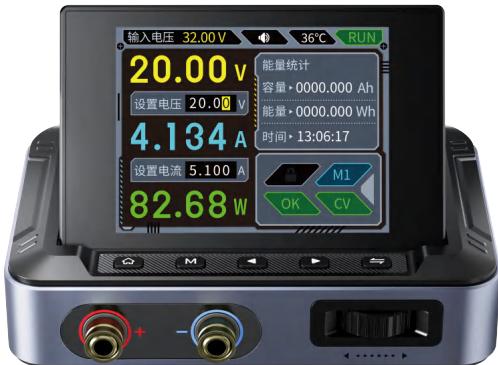
A palm-sized FNIRSI DPS-150 programmable supply (0–30V / 0–5A / 150W) for which the vendor only ships a Windows PC app. The community has fully reverse-engineered its USB serial protocol, so one line of pyserial reads telemetry, sets voltage and current, and switches the output. The first half of this page collects the specs and UI from the official manual (with product photos); the second half is the reverse engineering and the pitfalls we hit (DPS-150P / firmware V1.6). The code is packaged as
tool/dps150.py.
Official resources
FNIRSI official product page · Official manual PDF (archived here) · FNIRSI website
Specs at a Glance (Official Manual)
| Item | Value | Item | Value |
|---|---|---|---|
| Model / screen | DPS-150 · 2.8-inch 320×240 | Output voltage / current / power | 0–30V / 0–5A / 0–150W |
| Input voltage / current | DC 5.0–32V / 100mA–5A (supports PD / QC fast charging, can run off a power bank) | Full-load efficiency | High (as stated in the manual; see the PDF) |
| Setting resolution | voltage 10mV · current 1mA | Setting accuracy | voltage ≤0.1%±5mV · current ≤0.1%±3mA |
| Read-back accuracy | input voltage ≤0.2%±5mV · output voltage ≤0.1%±10mV | Load regulation | 0.49% |
The manual calls it DPS-150, but the actual unit is DPS-150P (this page uses the real model throughout).
Panel and Main Screen
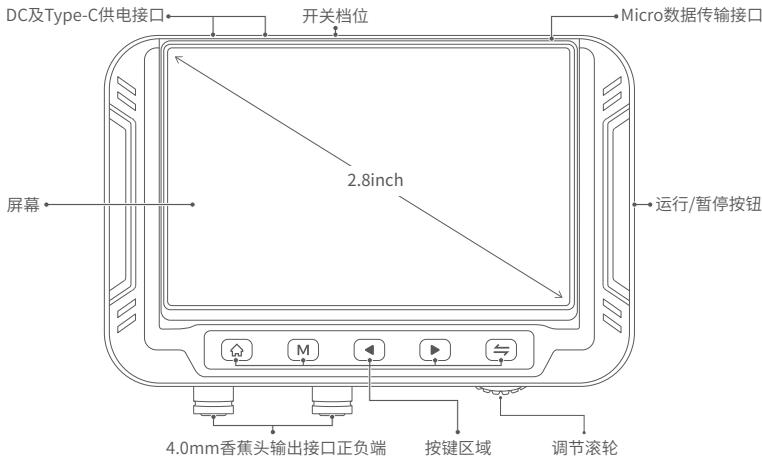
The front has a 2.8-inch screen plus six buttons (the wheel slides left and right to adjust values):
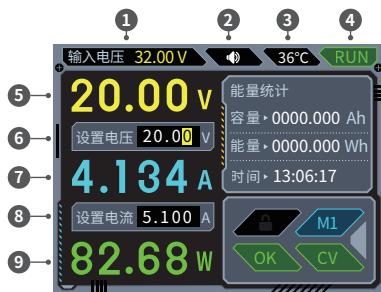
The main screen is dense (matching the manual's numbered callouts): input voltage, internal temperature, run state, live V/A/W and accumulated energy (Wh/Ah), voltage setpoint (0.01V steps), current setpoint (0.001A steps), preset group number, panel lock state and output mode.
There are seven run states; any of them other than OK turns the output off automatically and sounds the buzzer:
| State | Meaning |
|---|---|
OVP / OCP / OPP | over-voltage / over-current / over-power protection |
OTP | over-temperature protection |
REP | reverse-polarity protection |
LVP | under-voltage protection (the output cannot be turned on in this state) |
Preset groups: the device stores 6 presets (M1–M6), each with its own voltage and current-limit setpoint; a short press switches between them — handy when powering several devices in turn.
Output modes: constant voltage CV or constant current CC.
Operating Essentials
- Adjusting values: click the settings key to enter the highlighted field, then slide the wheel left/right to change it; click again to switch between the voltage and current setpoints, short-press to save and exit
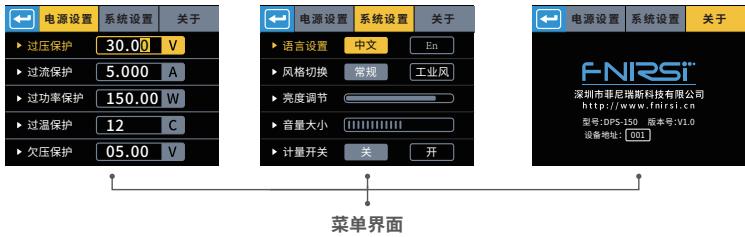
- Menu items (Power Settings / System Settings / About): the OVP/OCP/OPP/OTP/LVP thresholds are each configurable, plus language, standard ↔ industrial UI style, backlight brightness, volume and metering on/off
- Saving a preset: open the data group page → click to highlight a field → adjust with the wheel → short-press to save
- ⚠️ Once the PC app is connected the control panel locks itself (the lock icon turns white) and only unlocks when the serial session ends — the control tool we wrote later triggers this too
Advanced Features Built into the PC App
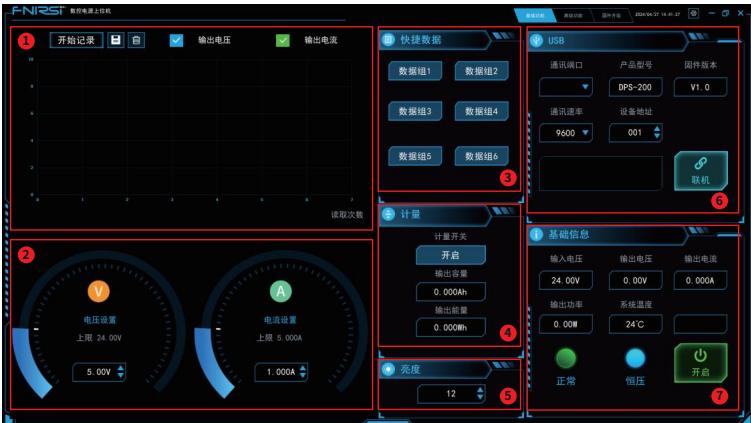
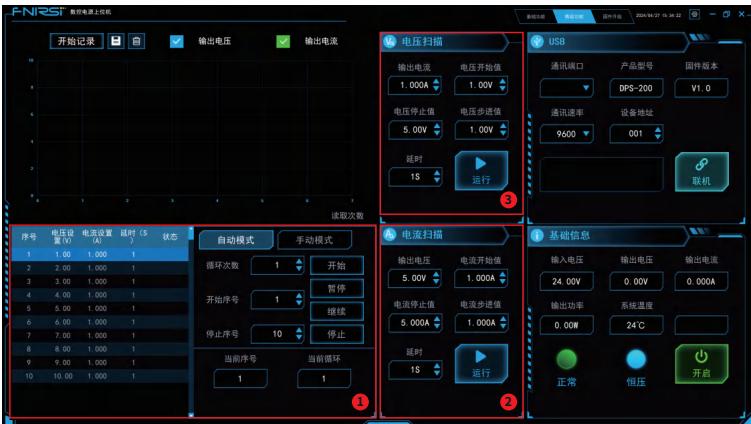
Besides basic monitoring and waveform logging (the voltage/current curves zoom with the wheel and can be saved or deleted), the official Windows app has three advanced "run the output like a program" features:
| Feature | What it does |
|---|---|
| Sequence output | steps through preset V/I values on a timer, within a step range and loop count; supports manual single-stepping, pause/resume |
| Current sweep | voltage fixed, current sweeps from start to end as "step current + delay" (common in CC mode) |
| Voltage sweep | current fixed, voltage sweeps from start to end as "step voltage + delay" (common in CV mode) |
Firmware Upgrade (Two Routes)
- USB-drive method: hold the upgrade key while plugging in the data cable; a USB drive shows up on the computer, copy the firmware in and the device upgrades itself
- PC app method: once connected, click "Firmware Upgrade → BOOT/restart"; the same USB drive appears for copying the firmware
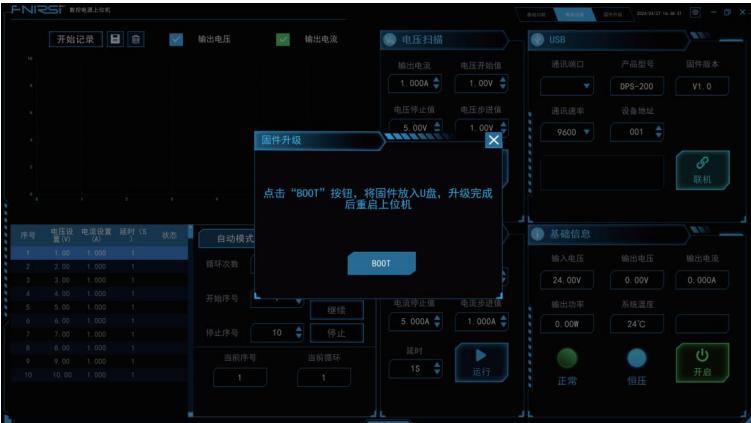
⚠️ Note: firmware upgrade uses DFU mode. Don't confuse it with
0xC0in our serial protocol — that's the "enter DFU" command byte, and sending it by mistake drops the serial port entirely (see the dangerous byte at the end).
Device Identification
It connects over the Micro-USB data port and enumerates as a USB CDC virtual serial port (the internal MCU is an Artery AT32):
bash
system_profiler SPUSBDataType | grep -A6 "AT32 Virtual Com Port"   # 识别设备
ls /dev/cu.usbmodem*                                               # 串口设备节点
Protocol Overview (Community Reverse Engineering)
The frame is minimal — 1 header byte + command + register + length + data + checksum:
| 0xF1 | Command | Register | Length | Data (0..N) | Checksum |
|---|---|---|---|---|---|
| Header | Cmd | Reg | Len | Data… | Sum |
Checksum =
(寄存器 + 长度 + Σ数据) & 0xFF(header and command are excluded); the device replies with header0xF0; all values are IEEE754 float32 little-endian.
Command bytes:
| Command | Purpose |
|---|---|
0xA1 | read register |
0xB1 | write register |
0xB0 | set baud rate |
0xC1 | session connect / disconnect |
0xC0 | ⚠️ enter DFU flash mode — never send this (the CDC port disappears; replug to recover) |
Key registers:
| Register | Type | Meaning |
|---|---|---|
0xC1 | float32 | voltage setpoint |
0xC2 | float32 | current setpoint |
0xDB | uint8 | output switch (0/1) |
0xC0 | float32 | input voltage |
0xC3 | 3×float32 | measured output V/A/W |
0xDC | uint8 | protection status (0=OK,1=OVP…6=REP) |
0xDD | uint8 | 0=CC / 1=CV |
0xFF | 139B | full status dump (6 presets, protection thresholds, Ah/Wh) |
Control Loop Measured
One command sets the values and turns the output on; the soft start ramps up in about 1.5 s:
| Capability | Measured |
|---|---|
| Read model / firmware / hardware | DPS-150P · V1.6 · V1.0 |
| Read telemetry | input 20.08V, temperature 30.5°C, output V/A/W, full 139-byte status |
| Write setpoints | 5.000V / 0.500A, read back identical |
| Output on/off | on → 5.000V (soft start ~1.5s); off → discharges to zero in ~1.2s |
Common operations:
bash
python3 tool/dps150.py status                               # 读全状态
python3 tool/dps150.py set --voltage 12.0 --current 2.0     # 设 12V/2A(不开启)
python3 tool/dps150.py set --on                             # 开输出
python3 tool/dps150.py set --off                            # 关输出
Pitfall Archive
| Symptom | Root cause | Solution |
|---|---|---|
| Register reads come back scrambled, only 12 bytes | the device pushes telemetry frames unsolicited (0xC3 etc.) into the response stream | filter the read-back by register number and drop non-target frames |
| Reading 0xE2/0xE3 on their own returns 0 | the capability registers only carry values in the pushed frames | take max V/I from offsets 0x6F/0x73 of the full status dump |
| Setting 30V doesn't stick | buck architecture: the output ceiling is clamped below the input voltage (20V in → 19.88V max) | raise the input voltage if you need more output |
| Right after enabling, the voltage reads only a fraction of a volt | the soft start is still ramping | wait ≥1.5s before reading |
| Panel buttons stop working | connecting the PC app auto-locks the panel | end the serial session to unlock |
One dangerous byte
0xC0 isn't a reboot — it enters DFU flash mode: the USB CDC port vanishes and you must physically replug to recover. The device has no soft-reboot command.
Reproduction and Sources
- Control tool:
tool/dps150.pyin thefnirsi-dps150skill (only depends on pyserial) - Protocol source: community reverse engineering nasheed-x/dps150_api (PROTOCOL.md, cross-checked against four implementations in JS/C/Python/Rust plus a decompiled official .NET app)
- Official resources: FNIRSI official product page · official manual PDF (all specs and UI images here come from that manual, archived on this site)
- For the full register map, the 139-byte layout and the preset group formulas, see the
fnirsi-dps150skill reference docs