Appearance
SLogic16U3: An 800MHz Logic Analyzer, from Specs to the Full sigrok Stack
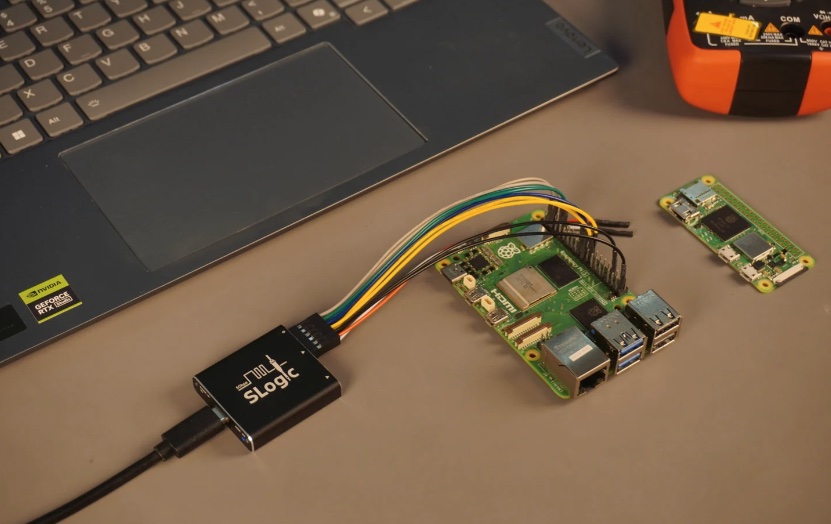
The Sipeed SLogic16U3 is a 40×40×10mm USB3 logic analyzer: 800MHz@4ch / 400MHz@8ch / 200MHz@16ch, 0–10V signal input with a configurable 0–6V threshold, an aluminum case, from ¥369. It speaks the standard sigrok/libsigrok protocol — the first half of this page collects the official specs and hardware interfaces (with real photos); the second half is the hands-on chain on an Apple Silicon Mac: capture waveforms straight from the CLI and decode 131 protocols.
Official resources
Product introduction (Sipeed Wiki) · Hardware manual · SLogic software downloads · GitHub libsigrok · slogic-dev
Specs at a Glance (Official)
| Attribute | SLogic16U3 | For comparison: Combo8 | For comparison: 32U3 |
|---|---|---|---|
| USB | USB3.0(5Gbps) | USB2.0 | USB3.2 Gen2 |
| Max sample rate / channels | 800M / 16ch | 80M / 8ch | 1500M / 32ch |
| Typical combination (continuous streaming) | 800M@4CH · 400M@8CH · 200M@16CH | 80M@4CH · 40M@8CH | 1500M@4CH · 800M@8CH · 400M@16CH · 200M@32CH |
| Max bandwidth | 3.2Gbps | 0.3Gbps | 6.4Gbps |
| Signal input range | 0–10V, adjustable 0–6V trigger threshold | threshold not adjustable | adjustable threshold |
| Size / case | 40×40×10mm · aluminum | 20×40×10mm · plastic | 50×50×10mm · aluminum |
| Price | from ¥369 | ¥69 | ~¥999 |
| Sigrok compatible | ✅ | ✅ | ✅ |
Sample rate and channel count trade off against each other: all 16 channels get you only 200MHz, and to reach 800MHz you drop to 4 channels (the measured commands are further down).
Hardware Interfaces and Wiring
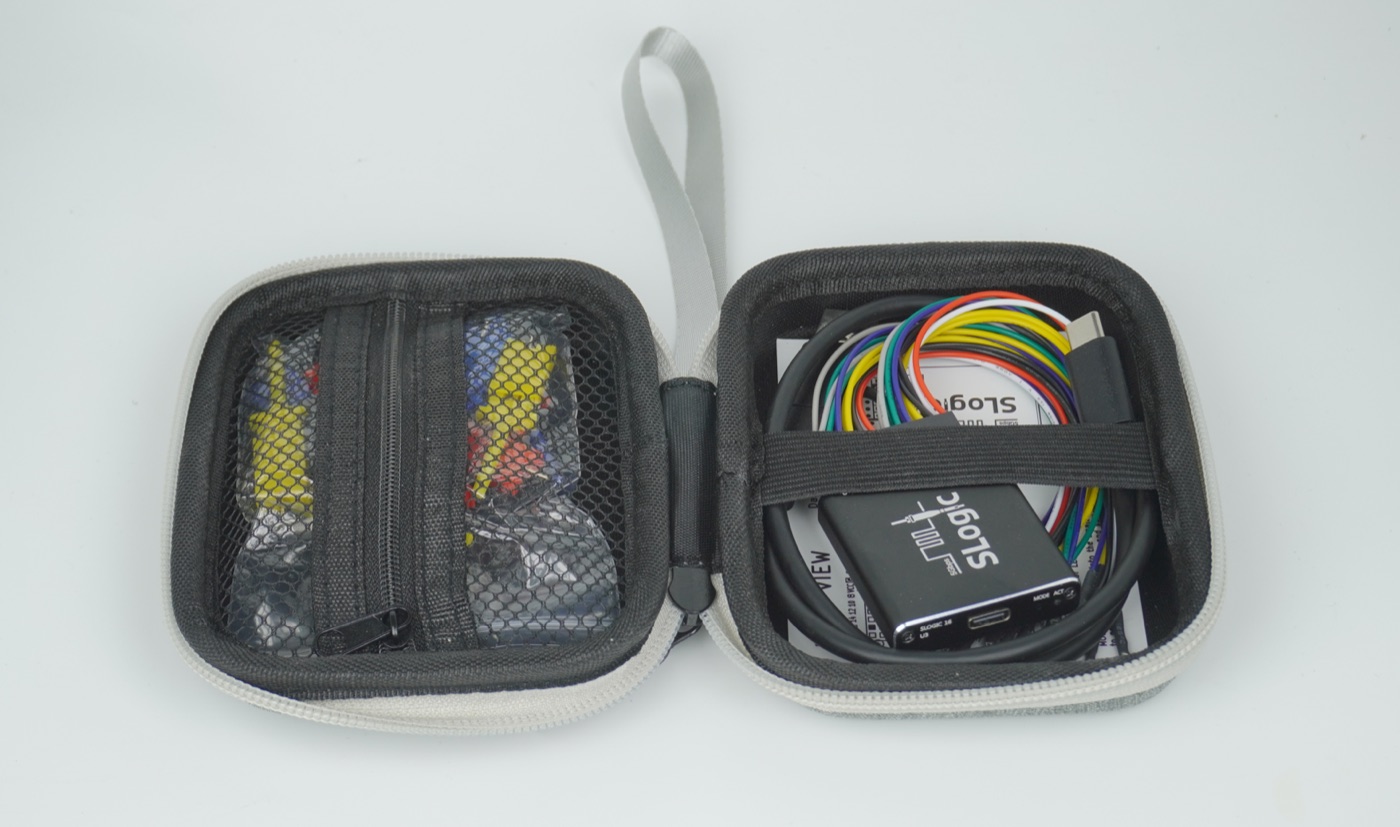
In the box: the unit, 2 × 2×6P DuPont wires (or 2 × 2×4P coax wires — pick one), 16 test clips, a USB3 data cable (A+C to C), a SIM-card pin, a quick-start card and a zippered pouch.
Rear Header (Sampling Side)
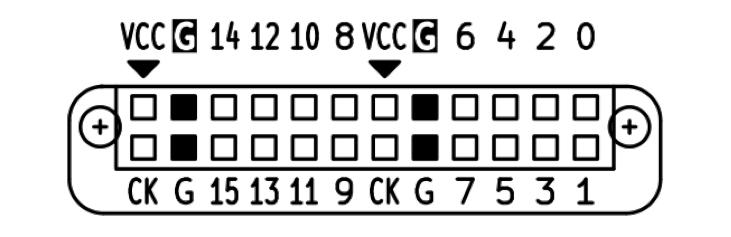
- 0–15: the 16 sampling channels, matching the channel numbers in the PC software
- G (×4): GND — you must tie the DUT's ground to the analyzer's ground reliably, as short as possible and as close to the measurement point as you can
- VCC (×2): power output (3.3V @ 500mA, shared across both pins) — ⚠️ it is not a signal input, and don't short it to GND
- CK (×2): reserved sampling clock input / trigger output (not usable yet)
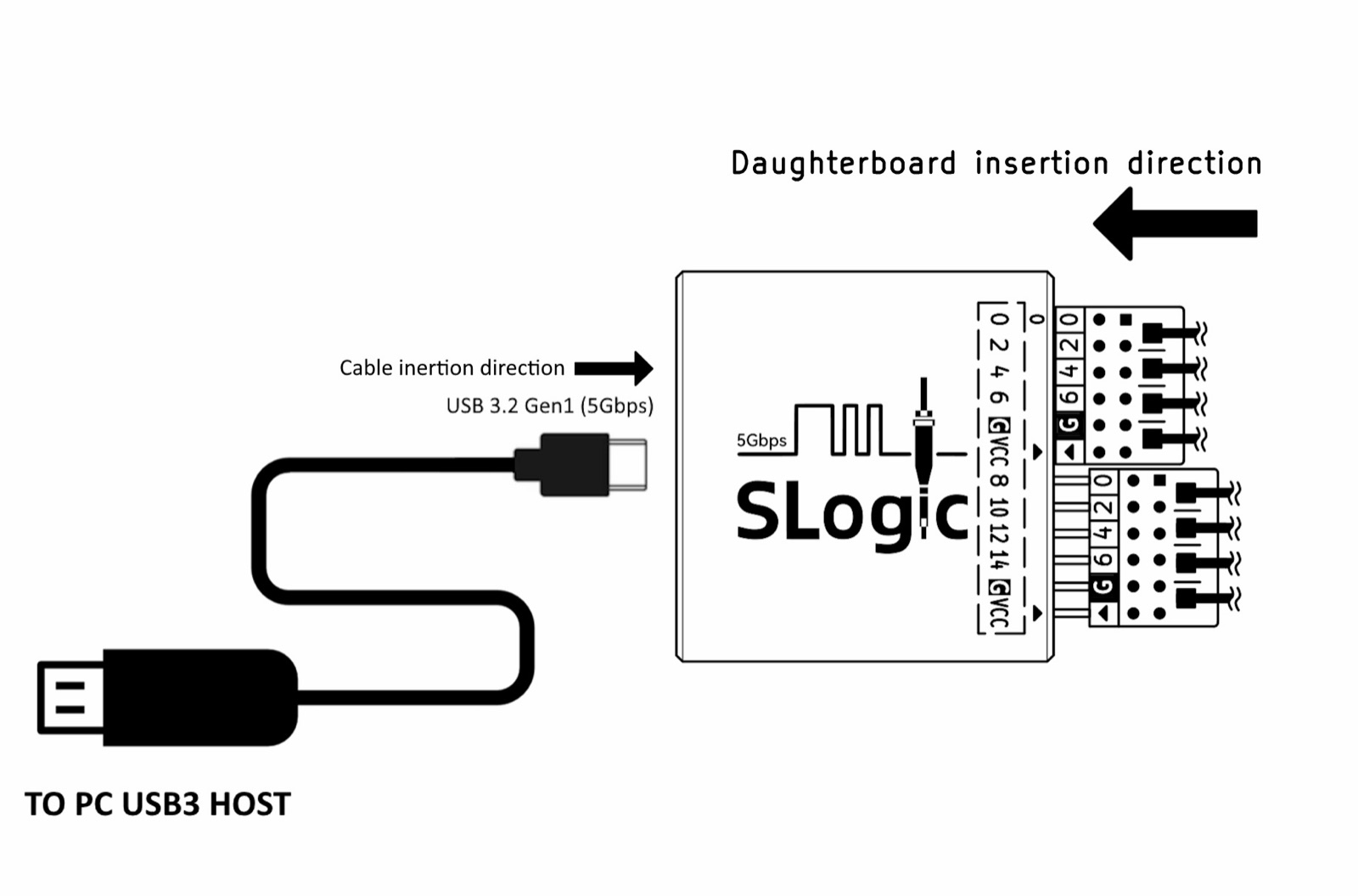
Orientation: the DuPont wire set / coax daughterboard is only the right way round when its triangle marker ▴ lines up with the ▾ on the case; on the far end of a coax cable the white terminal carries the signal and the black one goes to GND; when the Nyquist frequency is ≥50MHz, coax sampling is the steadier choice.
Front
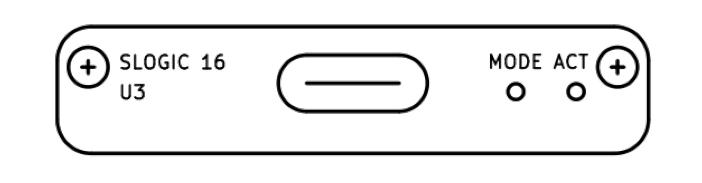
- USB-C: USB 3.2 Gen1 (5Gbps); you must use a USB3-capable cable (an ordinary phone charging cable won't do)
- MODE: a hidden button behind a pinhole (poke it with the SIM-card pin) that toggles between "logic analyzer" and "DFU upgrade" modes (see DFU below)
- ACT: a three-colour RGB status LED
ACT LED codes:
| State | Colour | Notes |
|---|---|---|
| Normal connection | cyan (blue+green) | blue = power, green = USB LINK, red = running |
| Data transfer | cyan + fast red blink | |
| DFU mode | cyan + slow red blink | |
| ⚠️ USB connection failed | blue only | usually the cable/port isn't USB3, or it's plugged into a front panel / hub |
| ⚠️ Flash load error | red only | a poor cable or a hardware problem |
Platform Support and Where to Get It
| System | Notes |
|---|---|
| Windows 10/11 | the native exe is limited by its USB driver to ~390MB/s → drops to 400M@4CH / 200M@8CH / 100M@16CH; use a Linux VM if you want full bandwidth |
| Linux (x86_64) | needs a udev rule for permissions (the official FAQ has one ready to use) |
| macOS (Apple Silicon) | works out of the box (the environment measured here) |
There are two ways to get the software:
- Download and go (try this first): Sipeed ships
sigrok-cli-SLogicper platform (Linux AppImage / Windows exe / macOS dmg) plus the PulseView GUI, all at the SLogic download site. - Build it locally (advanced; the route the second half of this page takes): compile Sipeed's
slogic-devbranch + sigrok-cli + the decoder library from source — the choice for anyone who wants to customise or track the source.
Protocol Stack: One Standard sigrok Chain
Control goes over vendor-specific USB control transfers (registers R32_CTRL/0x04, R32_FLAG/0x08, R32_AUX/0x0C) and sampling over USB3 bulk IN streaming — 2 bytes per sample across 16 channels.
Capture Measured
| Capability | Measured |
|---|---|
| Device identification | SLogic16 U3 · USB3.0 · VID:PID 359F:3031 |
| Capture | every step from 5MHz to 800MHz passes; zero bit errors at 200MHz/16ch and 800MHz/4ch |
| Self-test pattern | Emulation mode outputs a divide-by-two waveform (D0 is a full-swing square wave, halved at each step) |
| Protocol decoding | 131 decoders; a synthetic UART frame decodes to 0x55 with every bit and byte correct |
Emulation self-test mode (verifying the chain when there's no DUT) outputs a textbook divide-by-two pattern — D0 is a full-swing square wave up to 100MHz (flipping on every sample at 200MHz sampling), halving at each step with zero glitches:
bash
SR=/Volumes/my-work-arm/slogic-prefix/bin/sigrok-cli

# 16ch 200MHz 采 100 万样本 → CSV
$SR --driver sipeed-slogic-analyzer --config samplerate=200m \
    --samples 1000000 -O csv -o cap.csv

# 4ch 800MHz:先降硬件通道数
$SR --driver sipeed-slogic-analyzer --config logic_channels=4 \
    --config samplerate=800m --samples 500000 -O csv -o cap.csv

# 触发采集:D0 上升沿
$SR --driver sipeed-slogic-analyzer --config samplerate=20m \
    --triggers D0=r --samples 100000 -O csv -o cap.csv
Decoding Measured (Verifying the Pipeline with a Synthetic UART Frame)
When no signal is available, feed a synthetic frame in over VCD to verify a decoder:
| Segment | Idle | Start | d0…d7 (LSB first) | Stop | → Decoded |
|---|---|---|---|---|---|
| Level | 1 1 | 0 | 1 0 1 0 1 0 1 0 | 1 | 0x55 ✓ |
Real capture and decode works the same way (just hook up the wires):
bash
# UART:D0=RX;I2C:D0=SCL D1=SDA
$SR --driver sipeed-slogic-analyzer --config samplerate=20m --samples 1000000 \
    -P uart:baudrate=19200:rx=D0 -A uart
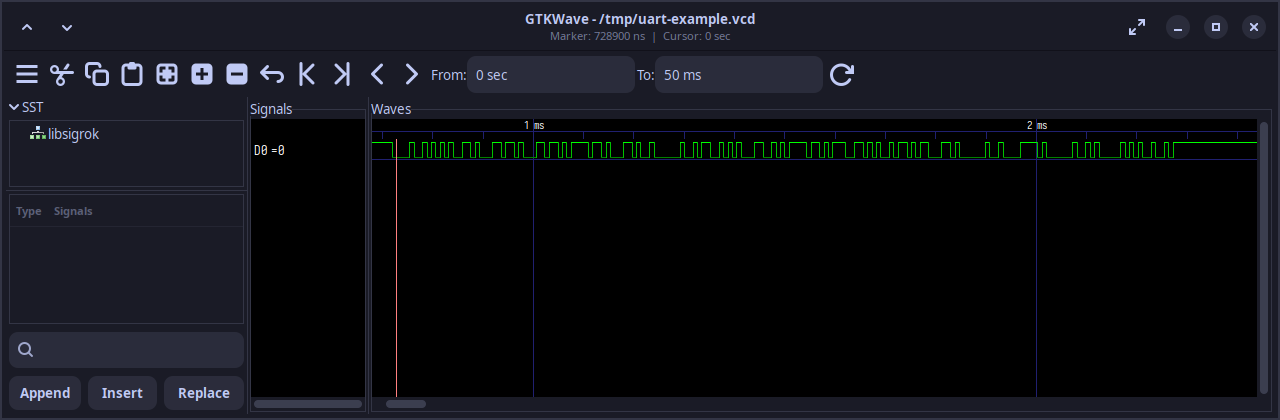
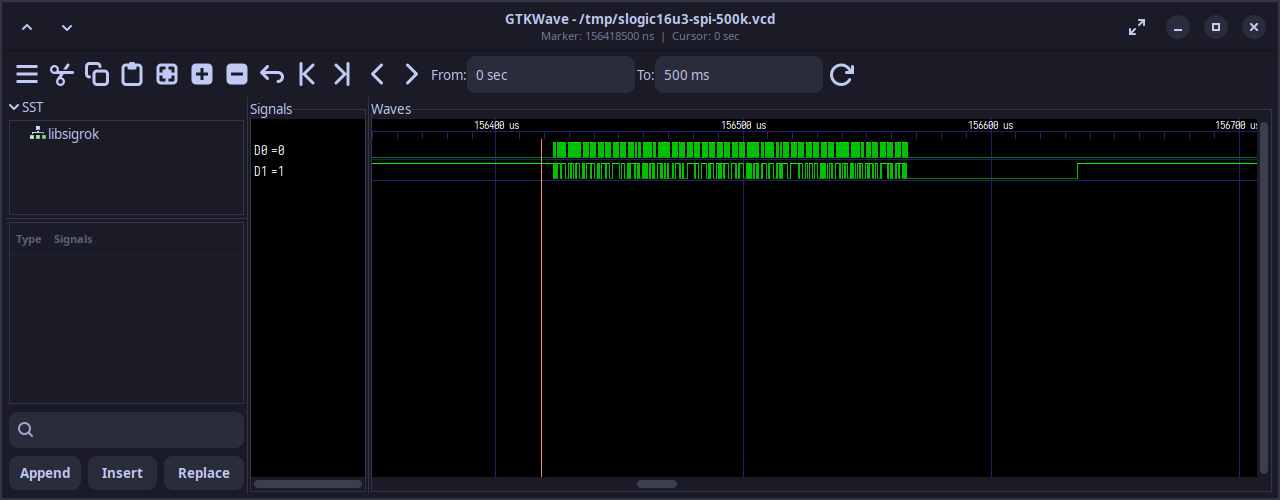
Reference waveforms (GTKWave screenshots from Sipeed's official tutorial): a UART 115200 frame and 500kHz SPI (CLK/MOSI/CS) — the decode matches the transmitter byte for byte:
Letting an Agent Drive It: the SLogic Agent Plugin
Sipeed also publishes an OpenAI plugin that wraps sigrok-cli as a skill — sigrok-cli-slogic-plugin. Once installed, you tell a plugin-aware Agent the channels, the protocol and the goal, and it calls sigrok-cli itself to scan for devices, capture .sr waveforms, decode with libsigrokdecode and report back the characters. For example, tell it:
D0 on the SLogic is wired to UART RX at 115200 8N1. Scan for the device first, then capture 50 ms at 10 MHz, save the raw waveform and decode the characters received.
The skill's built-in behaviour rules are nicely restrained: stop if no device is found, require an explicit pick when several are connected, return the absolute .sr path and the exact command after a capture, and report the pin mapping and any warnings after decoding — the same "scan to confirm capabilities, then capture" habit I follow.
Tutorial and downloads: SLogic for AI Agents: plugin quick start (with two complete hands-on examples, UART and SPI).
Pitfall Archive
| Symptom | Root cause | Solution |
|---|---|---|
| Setting 800MHz wraps down to 200MHz | only --channels D0-D3 was set, so the hardware still counts 16 channels | set logic_channels=4 (the hardware channel count) before lowering the sample rate |
--channels D0-D15 reports Invalid channel | the range syntax a-b only accepts purely numeric channel names, and this device uses D0 | use the comma list D0,D1,D2,D3, or omit it (all channels by default) |
| The build can't find Python headers | the system Python 3.9.6 has no dev headers and no python3-embed.pc | brew install python@3.12 and add its pkgconfig path to configure |
| A synthetic VCD decodes with the last bit missing | the frame lacks the leading idle high level, so the start-bit detection point shifts | add ≥2 bits of idle high level before the frame |
| A synthetic VCD decodes no bytes at all | the trailing frame is stuck high with no timestamp, so the input module truncates at the last transition | append an explicit #N end timestamp |
| Captured data is all zeros | nothing is connected (idle level), so it isn't a fault | verify the chain with pattern=Emulation self-test mode |
| Blue LED only and no device found | the cable/port isn't USB3 | use a USB3 cable, plug straight into a rear motherboard port, avoid hubs |
Reproduction and Sources
- For the complete build procedure (dependencies, fork URL, configure flags, idempotent scripts), see the
slogic16u3skill reference doc [1. Building from Source] - A prefix is already installed locally at
/Volumes/my-work-arm/slogic-prefix/(libsigrok 0.6 + sigrok-cli 0.8 + libsigrokdecode, 131 decoders) - Official resources: product introduction · hardware manual (all hardware images here come from these two, archived on this site) · SLogic for AI Agents
- Driver source: sipeed/libsigrok · slogic-dev; the official PC app PulseView (GUI); SLogic16U3 Tools (DFU firmware update tool)